mobile_scanner



A universal scanner for Flutter based on MLKit. Uses CameraX on Android and AVFoundation on iOS.
- Improvements
- By dynamically adjusting the positioning and scaling of the scan window relative to the texture, the package ensures optimal coverage and alignment for scanning targets.
- In the original package, If there are multiple barcode/qrcodes in the screen, the scan would randomly pick up any barcode/qrcode that shows in the screen, This upgrade fixes it and picks on the qrcode/barcode that is in the center of the camera.
- In the original package if you changed the camera size, it would still pick scans even if the barcode are not shown in the screen, This issue is also fixed in the upgraded packaged.
Features Supported
See the example app for detailed implementation information.
| Features | Android | iOS | macOS | Web |
|---|---|---|---|---|
| analyzeImage (Gallery) |  |
|
 |
|
| returnImage | |
|
|
|
| scanWindow | |
|
|
|
| barcodeOverlay | |
|
|
|
Platform Support
| Android | iOS | macOS | Web | Linux | Windows |
|---|---|---|---|---|---|
| ✔ | ✔ | ✔ | ✔ | |
|
Platform specific setup
Android
This packages uses the bundled version of MLKit Barcode-scanning for Android. This version is more accurate and immediately available to devices. However, this version will increase the size of the app with approximately 3 to 10 MB. The alternative for this is to use the unbundled version of MLKit Barcode-scanning for Android. This version is older than the bundled version however this only increases the size by around 600KB.
To use this version you must alter the mobile_scanner gradle file to replace com.google.mlkit:barcode-scanning:17.0.2 with com.google.android.gms:play-services-mlkit-barcode-scanning:18.0.0. Keep in mind that if you alter the gradle files directly in your project it can be overriden when you update your pubspec.yaml. I am still searching for a way to properly replace the module in gradle but have yet to find one.
You can read more about the difference between the two versions here.
iOS
Add the following keys to your Info.plist file, located in /ios/Runner/Info.plist: NSCameraUsageDescription - describe why your app needs access to the camera. This is called Privacy - Camera Usage Description in the visual editor.
If you want to use the local gallery feature from image_picker NSPhotoLibraryUsageDescription - describe why your app needs permission for the photo library. This is called Privacy - Photo Library Usage Description in the visual editor.
Example,
  <key>NSCameraUsageDescription</key>
  <string>This app needs camera access to scan QR codes</string>

  <key>NSPhotoLibraryUsageDescription</key>
  <string>This app needs photos access to get QR code from photo library</string>
macOS
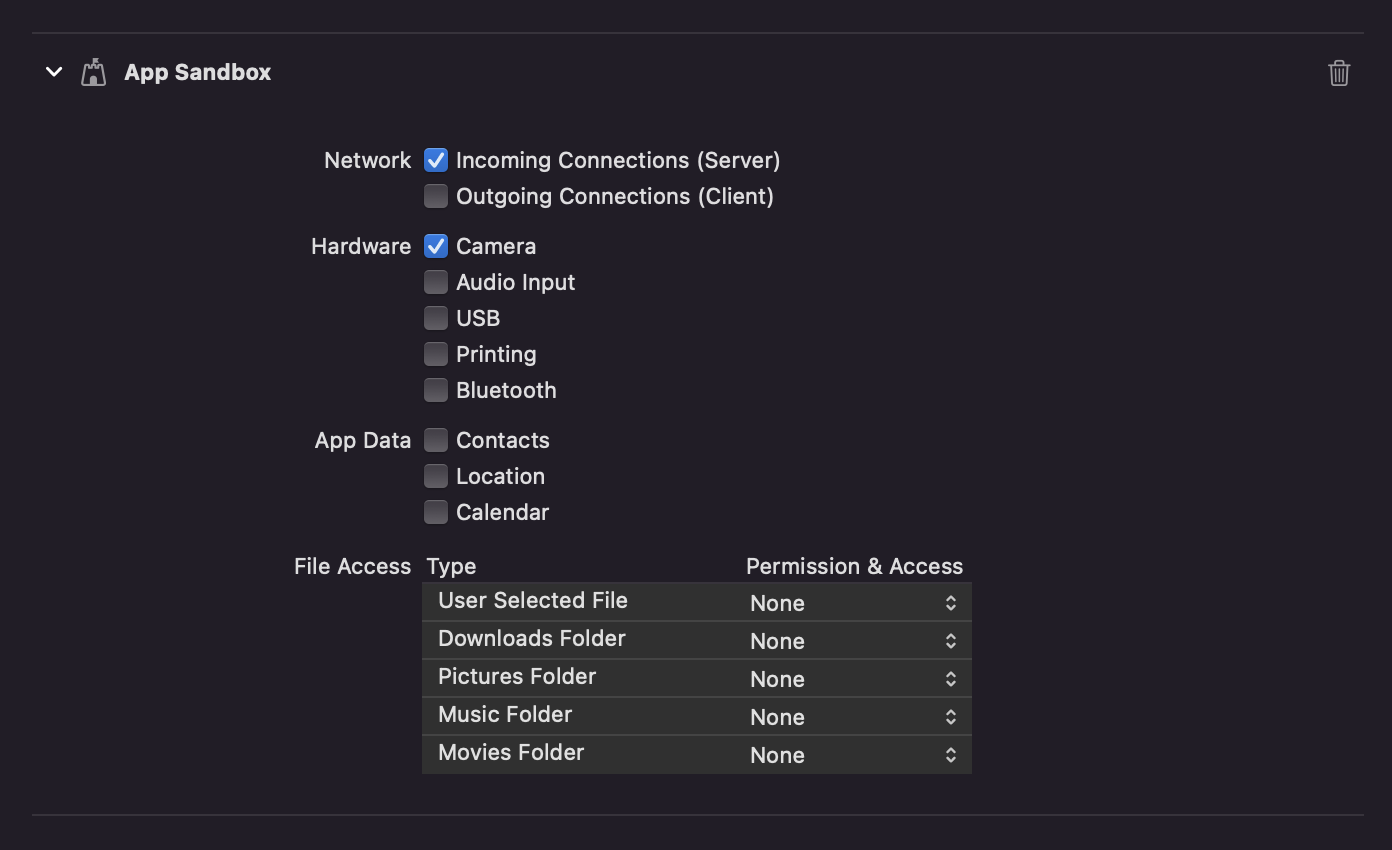
Ensure that you granted camera permission in XCode -> Signing & Capabilities:
Usage
Import package:mobile_scanner/mobile_scanner.dart, and use the widget with or without the controller.
If you don't provide a controller, you can't control functions like the torch(flash) or switching camera.
If you don't set detectionSpeed to DetectionSpeed.noDuplicates, you can get multiple scans in a very short time, causing things like pop() to fire lots of times.
Example without controller:
import 'package:mobile_scanner/mobile_scanner.dart';

  @override
  Widget build(BuildContext context) {
    return Scaffold(
      appBar: AppBar(title: const Text('Mobile Scanner')),
      body: MobileScanner(
        // fit: BoxFit.contain,
        onDetect: (capture) {
          final List<Barcode> barcodes = capture.barcodes;
          final Uint8List? image = capture.image;
          for (final barcode in barcodes) {
            debugPrint('Barcode found! ${barcode.rawValue}');
          }
        },
      ),
    );
  }
Example with controller and initial values:
import 'package:mobile_scanner/mobile_scanner.dart';

  @override
  Widget build(BuildContext context) {
    return Scaffold(
      appBar: AppBar(title: const Text('Mobile Scanner')),
      body: MobileScanner(
        // fit: BoxFit.contain,
        controller: MobileScannerController(
          detectionSpeed: DetectionSpeed.normal,
          facing: CameraFacing.front,
          torchEnabled: true,
        ),
        onDetect: (capture) {
          final List<Barcode> barcodes = capture.barcodes;
          final Uint8List? image = capture.image;
          for (final barcode in barcodes) {
            debugPrint('Barcode found! ${barcode.rawValue}');
          }
        },
      ),
    );
  }
Example with controller and torch & camera controls:
import 'package:mobile_scanner/mobile_scanner.dart';

  MobileScannerController cameraController = MobileScannerController();

  @override
  Widget build(BuildContext context) {
    return Scaffold(
        appBar: AppBar(
          title: const Text('Mobile Scanner'),
          actions: [
            IconButton(
              color: Colors.white,
              icon: ValueListenableBuilder(
                valueListenable: cameraController.torchState,
                builder: (context, state, child) {
                  switch (state as TorchState) {
                    case TorchState.off:
                      return const Icon(Icons.flash_off, color: Colors.grey);
                    case TorchState.on:
                      return const Icon(Icons.flash_on, color: Colors.yellow);
                  }
                },
              ),
              iconSize: 32.0,
              onPressed: () => cameraController.toggleTorch(),
            ),
            IconButton(
              color: Colors.white,
              icon: ValueListenableBuilder(
                valueListenable: cameraController.cameraFacingState,
                builder: (context, state, child) {
                  switch (state as CameraFacing) {
                    case CameraFacing.front:
                      return const Icon(Icons.camera_front);
                    case CameraFacing.back:
                      return const Icon(Icons.camera_rear);
                  }
                },
              ),
              iconSize: 32.0,
              onPressed: () => cameraController.switchCamera(),
            ),
          ],
        ),
        body: MobileScanner(
          // fit: BoxFit.contain,
          controller: cameraController,
          onDetect: (capture) {
            final List<Barcode> barcodes = capture.barcodes;
            final Uint8List? image = capture.image;
            for (final barcode in barcodes) {
              debugPrint('Barcode found! ${barcode.rawValue}');
            }
          },
        ),
    );
  }
Example with controller and returning images
import 'package:mobile_scanner/mobile_scanner.dart';

  @override
  Widget build(BuildContext context) {
    return Scaffold(
      appBar: AppBar(title: const Text('Mobile Scanner')),
      body: MobileScanner(
        fit: BoxFit.contain,
        controller: MobileScannerController(
          // facing: CameraFacing.back,
          // torchEnabled: false,
          returnImage: true,
        ),
        onDetect: (capture) {
          final List<Barcode> barcodes = capture.barcodes;
          final Uint8List? image = capture.image;
          for (final barcode in barcodes) {
            debugPrint('Barcode found! ${barcode.rawValue}');
          }
          if (image != null) {
            showDialog(
              context: context,
              builder: (context) =>
                  Image(image: MemoryImage(image)),
            );
            Future.delayed(const Duration(seconds: 5), () {
              Navigator.pop(context);
            });
          }
        },
      ),
    );
  }
BarcodeCapture
The onDetect function returns a BarcodeCapture objects which contains the following items.
| Property name | Type | Description |
|---|---|---|
| barcodes | List | A list with scanned barcodes. |
| image | Uint8List? | If enabled, an image of the scan. |
You can use the following properties of the Barcode object.
| Property name | Type | Description |
|---|---|---|
| format | BarcodeFormat | |
| rawBytes | Uint8List? | binary scan result |
| rawValue | String? | Value if barcode is in UTF-8 format |
| displayValue | String? | |
| type | BarcodeType | |
| calendarEvent | CalendarEvent? | |
| contactInfo | ContactInfo? | |
| driverLicense | DriverLicense? | |
| Email? | ||
| geoPoint | GeoPoint? | |
| phone | Phone? | |
| sms | SMS? | |
| url | UrlBookmark? | |
| wifi | WiFi? | WiFi Access-Point details |